Storefront MCP Server
The Fynd Storefront MCP server lets your AI agent shop on behalf of a customer on a storefront. It provides tools for product discovery, authentication, cart operations, checkout, and order management.
Think of it as giving your AI agent the same capabilities a customer has on your website, while still requiring customer approval before any irreversible action, such as placing an order.
On this page, you will:
- Understand how the Storefront MCP flow works.
- See the available tools and when to use them.
- Connect the server to popular MCP-compatible clients.
How It Works
- The customer sends a message, for example: Find me a blue running shoe under ₹3,000 in size 9 and order it.
- Your AI agent translates that intent into a sequence of Storefront MCP tool calls against the configured store domain.
- After the customer confirms, the agent places the order and returns the order ID and tracking information to them.
The agent does not take irreversible actions without confirmation from the customer, such as placing or cancelling an order.
See It in Action
The below given example video shows a complete purchase driven entirely by natural-language messages in Cursor. The agent searches the catalog, triggers OTP login when a session is required, checks eligible coupons, collects a delivery address, and finally confirms the order.
Limitations
- Only Cash on Delivery (COD) payment is supported for orders placed via the Storefront MCP server.
- OTP login is rate-limited to 3 requests per mobile number within any 15-minute window.
- Session state is tied to the MCP session ID returned on initialization. Losing the session requires re-authentication.
Recommended Tool Flow
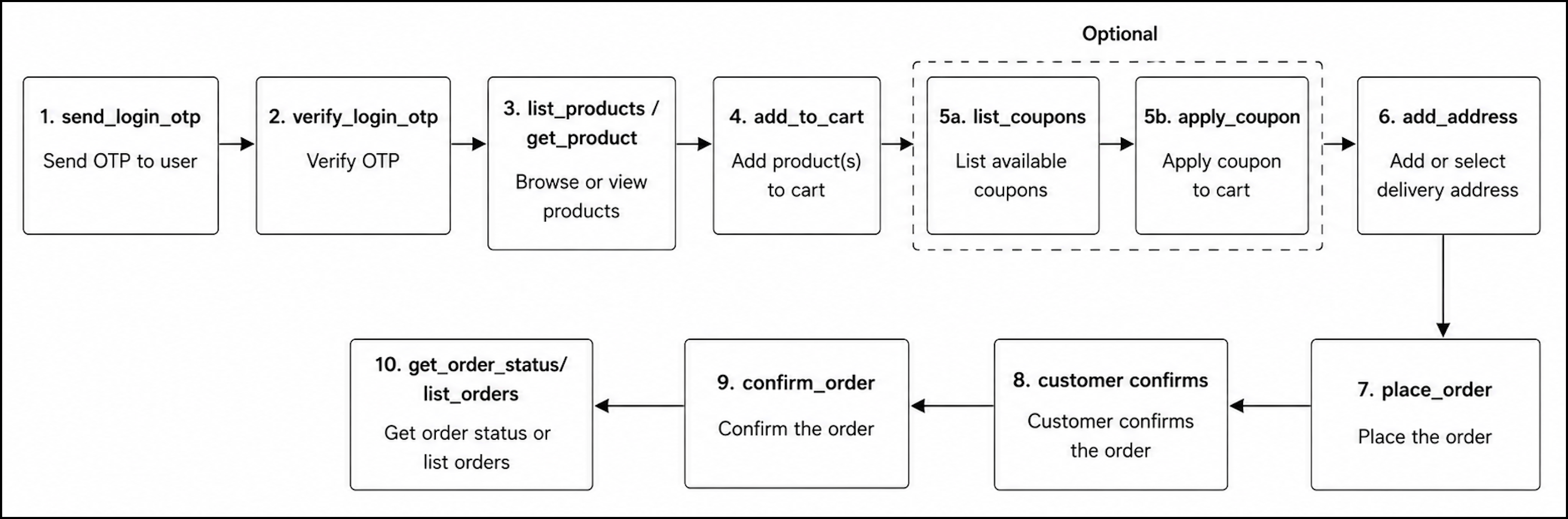
Endpoint
Each Fynd storefront exposes its own MCP endpoint:
https://${storeDomain}/api/mcp
Configure this URL dynamically based on the storefront the customer is currently using. If you operate multiple storefronts (for example, a fashion brand and a home-decor brand on separate domains), register a separate MCP server entry for each domain.
By using Fynd MCP servers, you agree to the Fynd API License and Terms of Use.
Connect the MCP Server
Prerequisites
You need a bearer token to authenticate requests to your storefront. Generate this token once per storefront and keep it secret.
- To obtain your application ID and token, refer to the Developer Page.
- To generate the base64-encoded token, refer to the Authentication section.
Client Configuration
Cursor
https://{website_domain} is a placeholder. Replace it with a live Fynd Commerce storefront URL, for example, https://fynd.com.
{
  "mcpServers": {
    "fynd-commerce": {
      "url": "https://{website_domain}/api/mcp",
      "headers": {
        "Authorization": "Bearer YOUR_BASE64_TOKEN"
      }
    }
  }
}
For more details, refer to Cursor MCP documentation.
Claude Code
Choose either of the following two methods to integrate the Storefront MCP server with Claude.
-
Add via CLI
claude mcp add fynd-commerce \
  --transport http \
  --url https://{website_domain}/api/mcp \
--header "Authorization: Bearer YOUR_BASE64_TOKEN" -
Add manually to
~/.claude/settings.json{
"mcpServers": {
"fynd-commerce": {
"url": "https://{website_domain}/api/mcp",
"headers": {
"Authorization": "Bearer YOUR_BASE64_TOKEN"
}
}
}
}
For more details, refer to Installing MCP servers.
Antigravity
In workspace settings, add the following:
{
  "mcpServers": {
    "fynd-commerce": {
      "url": "https://{website_domain}/api/mcp",
      "headers": {
        "Authorization": "Bearer YOUR_BASE64_TOKEN"
      }
    }
  }
}
For more details, refer to MCP Integration.
Any MCP-Compatible Client
This server uses the MCP Streamable HTTP transport.
- URL:
https://{website_domain}/api/mcp - Methods:
POST: Initialize a session and send requestsGET: Receive server-sent events (SSE)DELETE: Close the session
- Required header:
Authorization: Bearer <base64(APP_ID:APP_TOKEN)> - Optional header:
mcp-session-id, Session ID returned by the initialPOST
{
  "mcpServers": {
    "fynd-commerce": {
      "url": "https://{website_domain}/api/mcp",
      "headers": {
        "Authorization": "Bearer YOUR_BASE64_TOKEN"
      }
    }
  }
}
Tools
1. Authentication
The customer must be authenticated before using cart, checkout, or order tools. The agent sends an OTP to the customer's registered mobile number, then verifies it to establish a session. Once active, subsequent tool calls within the same MCP session automatically carry the customer's identity.
For example, if a customer asks to add a product to cart, the agent calls get_session_status first. If a session is already active, login is skipped. For a new session, the agent calls send_login_otp, prompts the customer for the OTP, then calls verify_login_otp to proceed.
| Tool | Description |
|---|---|
send_login_otp | Send an OTP to a mobile number (rate limit: 3 requests per number per 15 minutes). |
verify_login_otp | Verify the OTP and establish an authenticated session. |
get_session_status | Check whether the current MCP session has an active login. |
logout | End the session and clear authentication state. |
The following video shows the OTP login flow from sending the code to establishing an authenticated session.
2. Catalog
The catalog tools give the agent product-discovery capabilities. The agent can search products and apply filters such as price range, brand, size availability, and sort order.
For example, a customer asks, Show me shirts under ₹2,000. The agent calls list_products with the query "shirt" and a price filter. It presents the top results with name, price, and available sizes. The customer picks one; the agent calls get_product on that slug to confirm size availability before adding to cart.
| Tool | Description |
|---|---|
list_products | Search and list products with filters such as price range, brand, size, and sort order. |
get_product | Fetch detailed product information by slug including price, media, and available sizes. |
list_collections | Browse product collections with pagination. |
get_collection | Fetch collection details and the products within a collection. |
3. Cart
Once the customer selects a product and size, the agent manages the cart on their behalf. add_to_cart accepts a product slug, size, and quantity; get_cart returns a live snapshot of all items with an itemized price breakdown.
For example, the customer says, Add two pairs of those shoes in size 9. The agent calls add_to_cart with quantity: 2 and size: "9", then calls get_cart and presents the updated cart before proceeding to checkout.
| Tool | Description |
|---|---|
add_to_cart | Add a product to the cart by slug, with optional size and quantity. |
get_cart | Fetch current cart items and price breakdown. |
update_cart_item | Update the quantity or size of an existing cart item. |
remove_cart_item | Remove a product from the cart by item identifier. |
The following video shows the agent adding a product to the cart and displaying the updated cart summary with itemized pricing.
4. Coupons
After the cart is populated, the agent can surface available discounts to the customer.
For example, before checkout, the customer asks for available discounts. The agent calls list_coupons and presents the eligible codes with their discount descriptions. If the customer chooses one, the agent calls apply_coupon to apply it to the cart.
| Tool | Description |
|---|---|
list_coupons | List coupons available for the current cart. |
apply_coupon | Apply a coupon code to the cart. |
remove_coupon | Remove an applied coupon from the cart. |
The following video shows the agent fetching eligible coupons and applying a selected discount code to the cart.
5. Address and Checkout
With the cart finalized, the agent moves to delivery. It can list the customer's saved addresses or walk them through adding a new one.
For example, the customer asks to ship to a new address. The agent calls add_address with the provided details, validates the pincode, and saves the address. It then calls place_order, which returns a full order summary and a confirmation code.
| Tool | Description |
|---|---|
list_addresses | List saved delivery addresses for the customer. |
add_address | Add a new delivery address (includes 6-digit pincode validation). |
place_order | Generate an order preview with cart summary, totals, and COD eligibility. Returns a confirmation code required by confirm_order. |
The following video shows the agent collecting a new delivery address.
6. Order Management
Once the customer confirms, the agent calls confirm_order to finalize the purchase. From that point, the agent can track shipment progress, retrieve full order details, or if requested, cancel the order.
For example, after placing the order, the agent responds with the order ID and estimated delivery date. The next day, the customer asks, "Where is my order?" The agent calls get_order_status with the order ID and returns the current shipment status.
| Tool | Description |
|---|---|
confirm_order | Confirm and place the COD order using the confirmation code returned by place_order. |
get_order_status | Fetch order details, shipment status, and timestamps. |
cancel_order | Cancel an order (requires explicit customer confirmation). |
list_orders | List all orders for the customer, with pagination. |
The following video shows the agent confirming an order and then querying its shipment status using the order management tools.
For the implementation and setup, you can also refer to the Fynd Commerce MCP (GitHub)↗ page.